how to enable USB debugging on locked phone. This tutorial will allow you to enable ADB Fastboot setting in Samsung mobile phones while it locked FRP.
Table of Contents
How to enable USB debugging on locked phone
Required
- MInimal ADB fastboot files
- adb enabled.zip link has been removed.
Instructions
This method is working on Samsung Mobile like j7 nxt android version 7.0. This tool is only for Samsung
- Fist Install Minimal ADB & Fastboot tools
- extract the Downloaded file and keep it on desktop
- Now on your phone, you need to first open calculator and type code
- Code to Enter in Calculator: ” (+30012012732+ “
- it will open dial window and type code *#0808# “
- now select DM + ACM + ADB and reboot your device
- open ADB FRP Removal folder and run Samsung FRP Helper V0.2.exe
- from top tab select ADB Method and click Remove FRP
- just restart your device
- Device Into debugging mode.
USB debugging
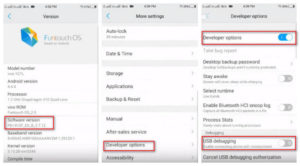
By debugging device you can operate mobile fall by command line. It can be used to unlock Samsung mobile phone by command line. You need to put your mobile device into the debugging mode by a calculator.