HighTech Remove FRP lock G973D without a Combination on Samsung S10. G973D U4 G973D U3 U2 U5 bypass google account lock 2020 latest solution We are going to bypass the FRP lock from Samsung S10 G973D. in this solution, we are not going to use any combination file that is means we will unlock Samsung Galaxy S10 without a combination file.
HighTech Remove FRP lock G973D without a Combination process will also work on Samsung S10 G973D, and following without any Samsung combination file.
Table of Contents
Step by step remove FRP lock Samsung G973D
To remove FRP lock from Samsung S10 Plus you have to download Combination.
Download SM-G973D Combination file
Estimate Cost : USD
Time Needed : 00 days 00 hours 35 minutes
We are going to remove FRP lock from Samsung G973D without a combination file. We required the Pangu FRP login tool and google account manager 8.0 to remove FRP account. Lets HighTech Remove FRP lock G973D without a Combination
Check FRP locked on Samsung S10 G973D.
First, we are going to check that the G973D device is locked or not.
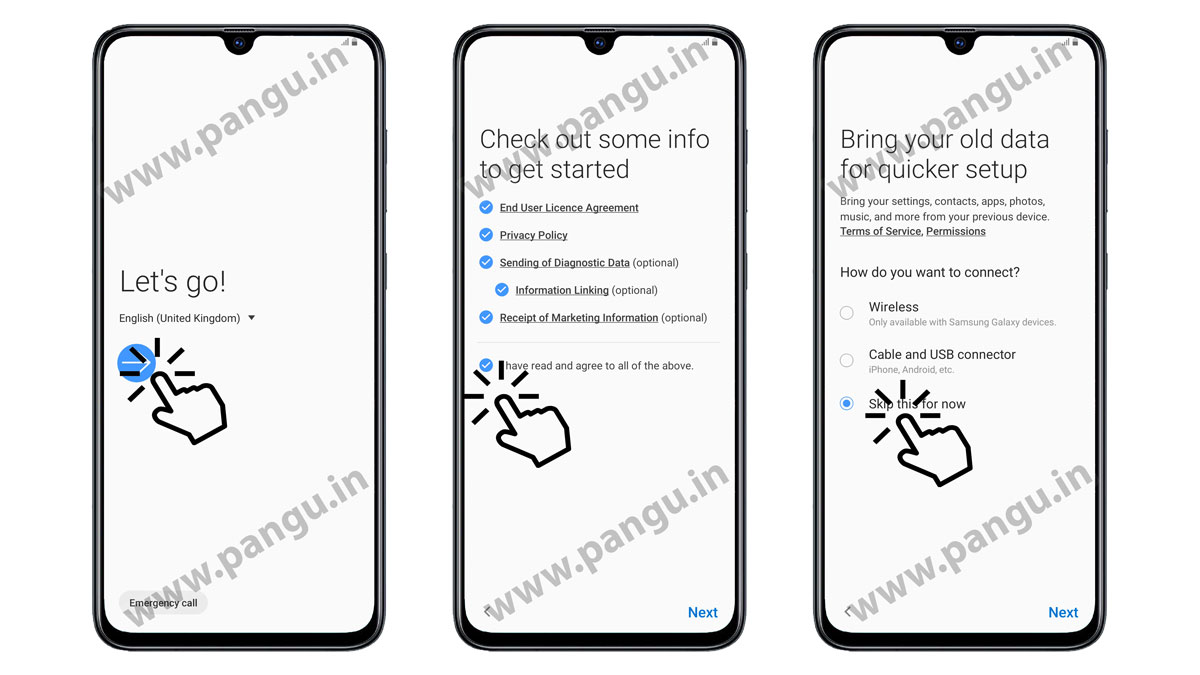
Connect WiFi on Samsung S10 G973D.
we need to connect S10 G973D with WiFi to process step faster. in case you do not have a WiFi connection you may use Samsung S10 SIM card internet data.
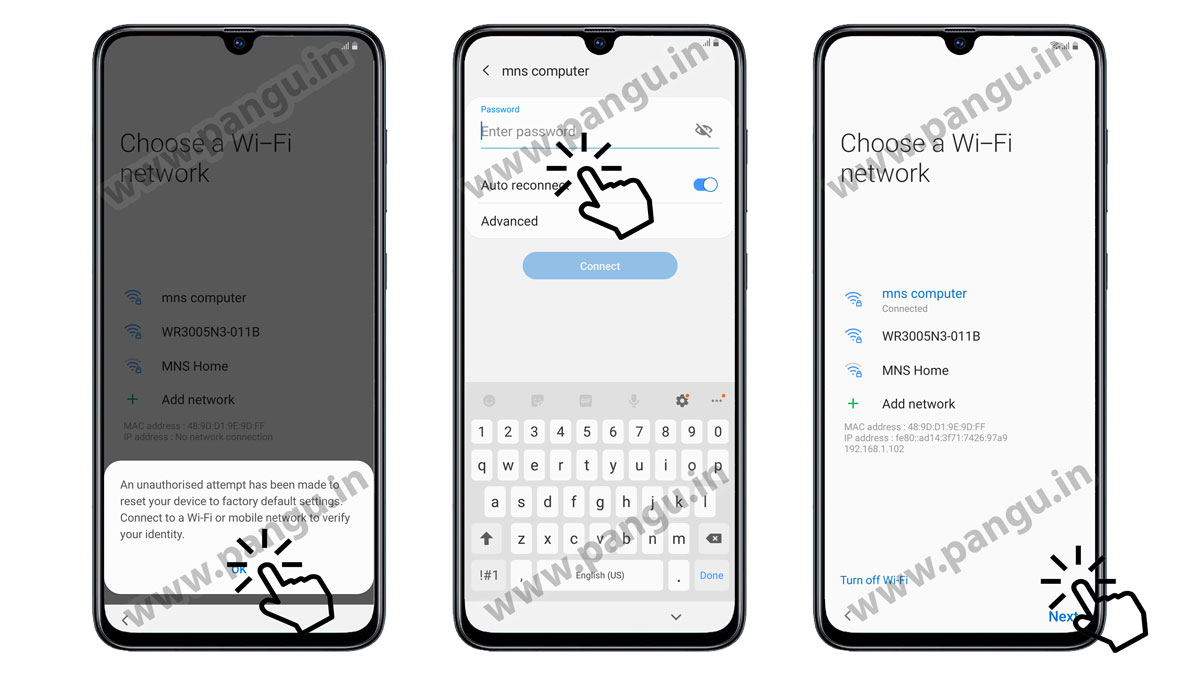
Setup PIN lock on SIM card for G973D
We require a SIM card with a PIN code locked. You can take another mobile to set up a lock on the SIM card. Insert locked SIM card into Samsung G973D.
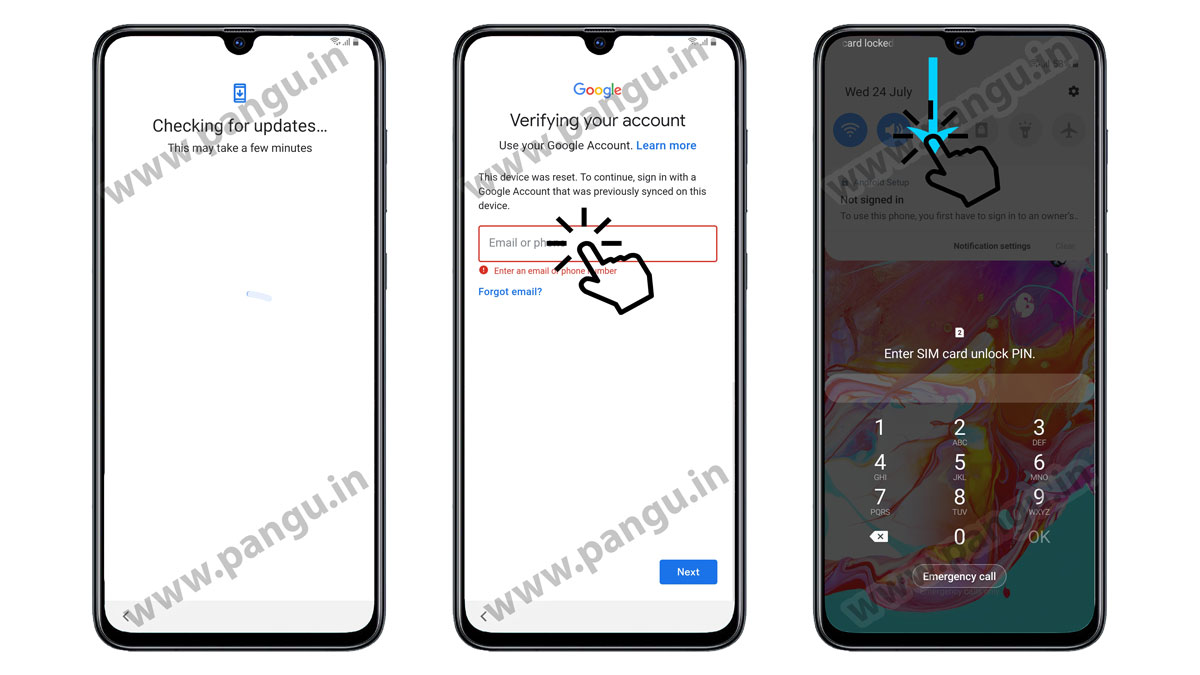
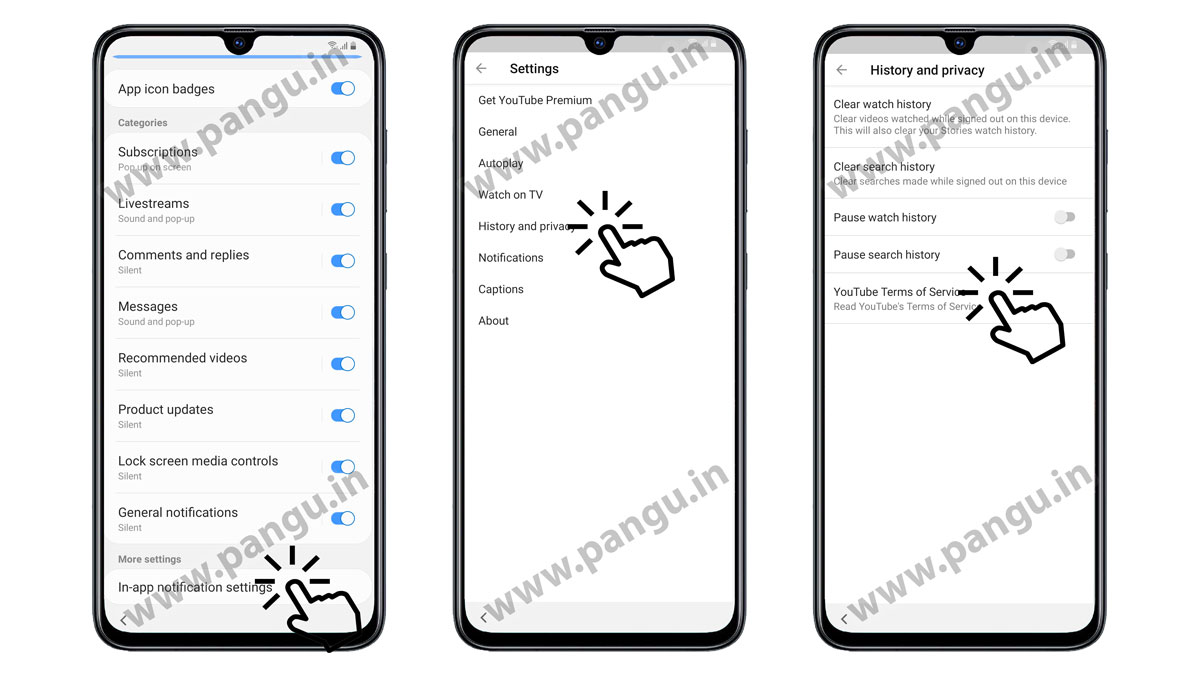
Open YouTube application on S10 G973D
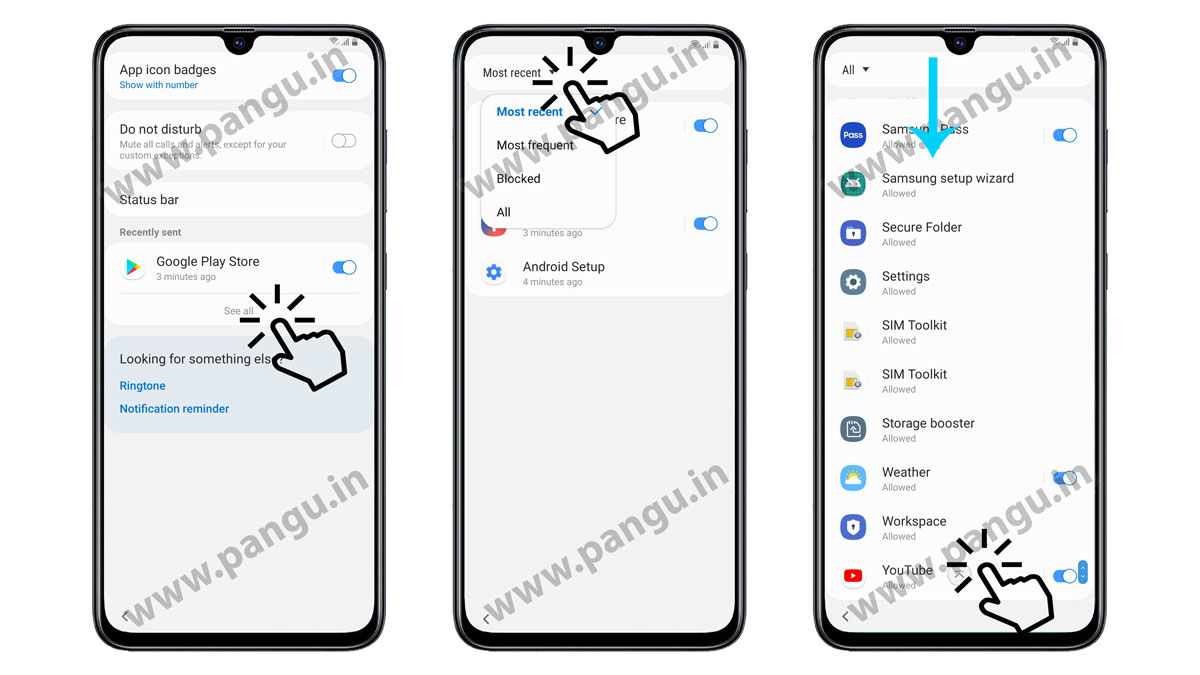
for open YouTube application settings in Samsung S10 G973D you need to open recently send APPS->click on see all -> click on most recent -> go to down and select YouTube application.
Open in app notification settings in S10 G973D
To open in-app notification settings in S10 G973D you have to scroll down at the last option, you will find in-app notification settings. – > Select history and privacy settings in S10 G973D. after open history and privacy, option open YouTube terms, and services in G973D.
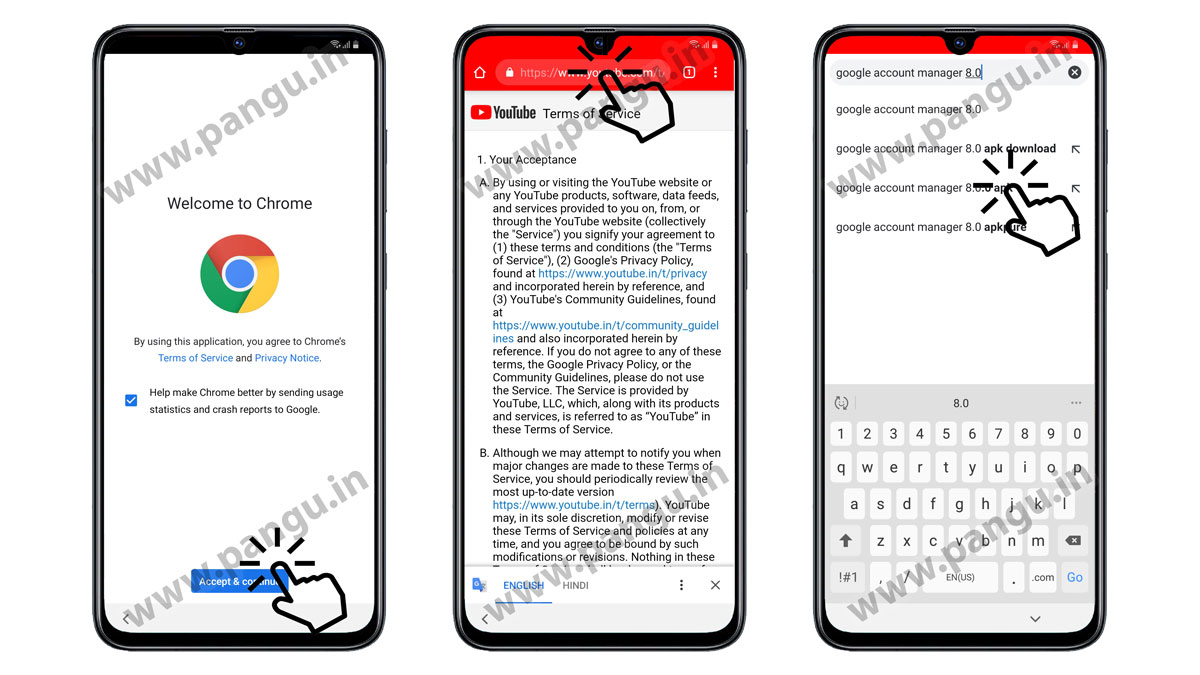
Open google chrome browser in Samsung S10 G973D
On S10 G973D After open chrome browser click on the accept term and continue. In Samsung S10 G973D go to the URL field and type google account manager 8.0.
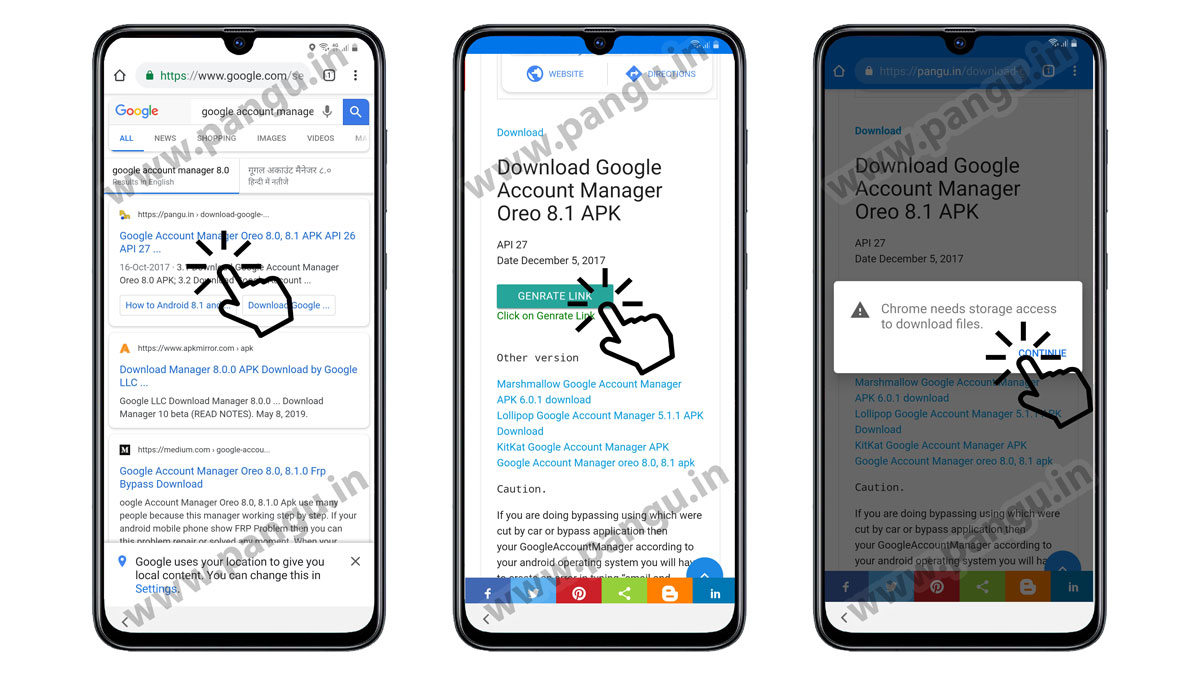
Find Google account manager 8.0 for G973D
After the result comes out select the Pangu.in site to download google account manager for Samsung S10 G973D. Open the page and find the download button, accept term and condition in chrome browser.
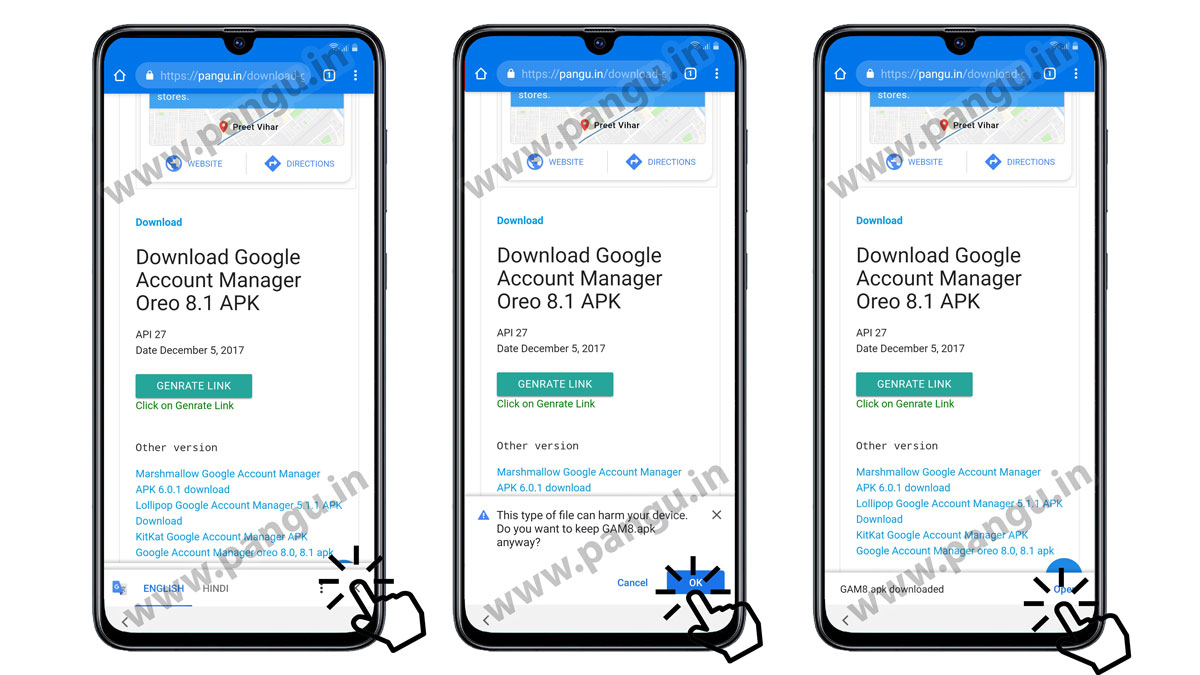
On Samsung G973D Download Google account manager 8.0
On your Samsung S10 G973D do, not close google translator bar it will help you to download google account manager. when you press the download button after three-seconds close the google translator bar. On Samsung S10 G973D you will see this type of file can harm your device do you want to continue to keep APK anywhere Click on the open button.
Install google account manager 8.0 on S10 G973D
First-time google chrome asks for permission to download the unknown file on Samsung S10 G973D.
“For your security, your phone is not allowed to download unknown File from this source”
On Samsung S10 G973D click on settings and enable the allow from this source
“Install the app from this source may harm your phone and data at risk”.
“You want to install this application It does not require any special access.“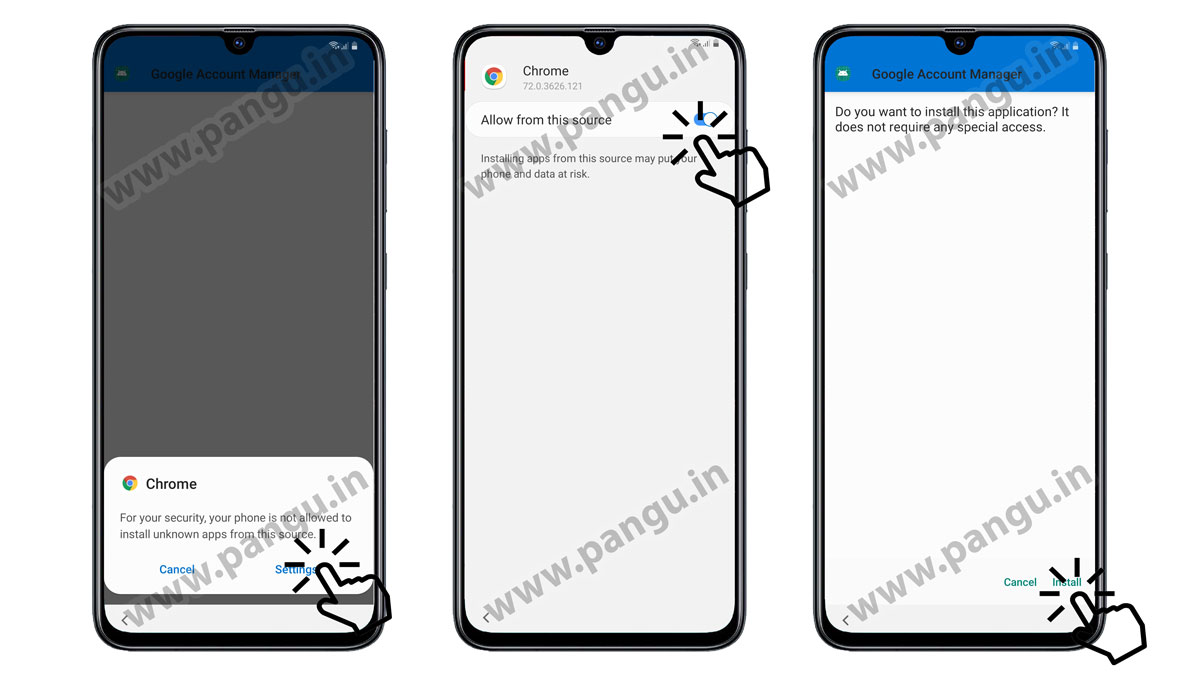
Download Pangu FRP account login tool FRP file Samsung G973D
After successfully install the Google account manager go to google and search the Pangu FRP account login tool on Samsung S10 G973D open the first result or maybe the second result the title must be the Pangu FRP account login tool.
Find a download button.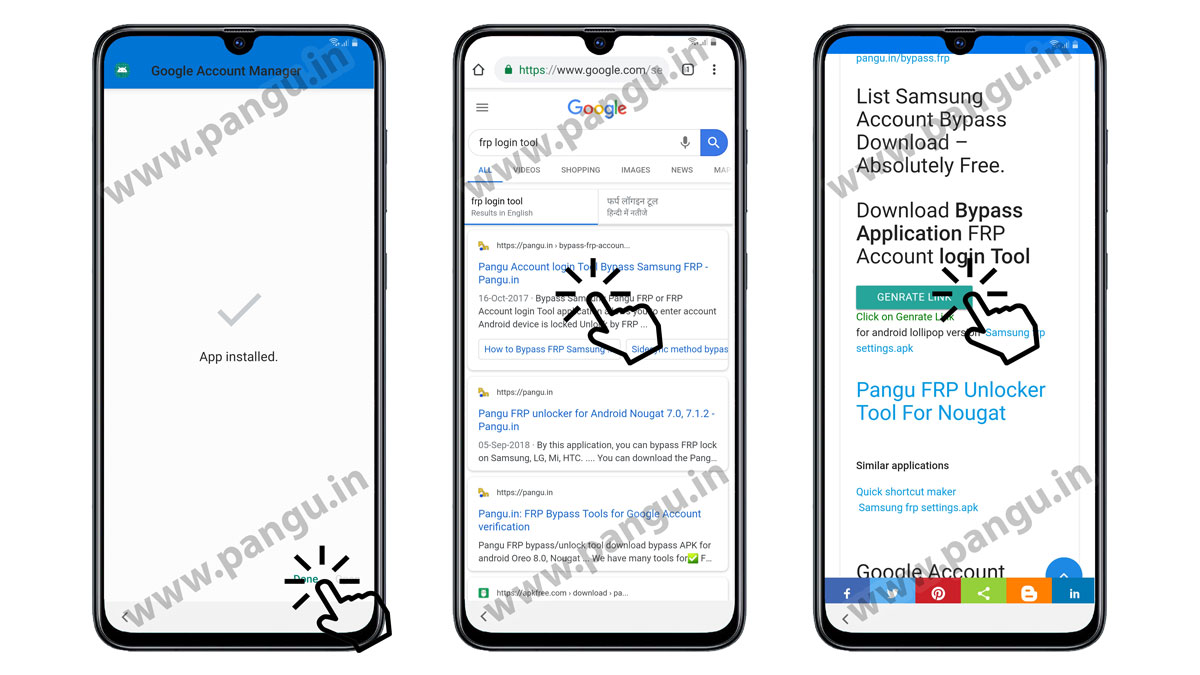
Install Pangu FRP account login tool on G973D
To download this application you have to close the Google translator bar on Samsung S10 G973D after that you will see download option click on the okay button after download complete close Google translator bar.
Click on the open button. Just install the Pangu FRP account login tool.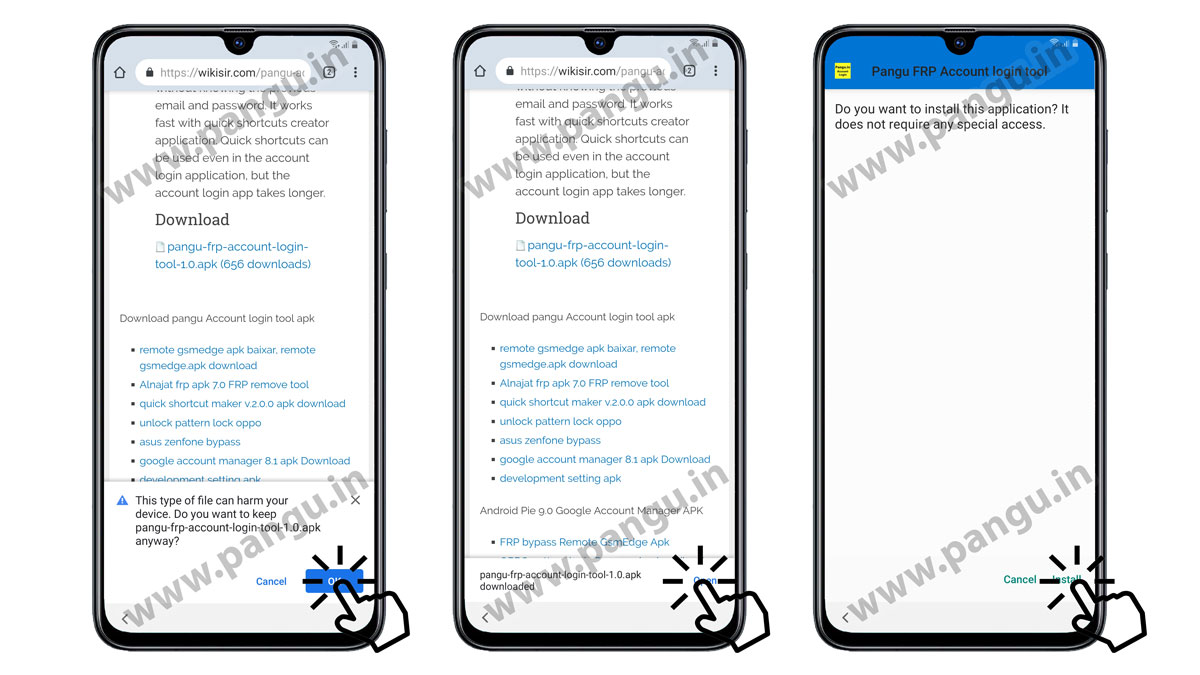
Enter Google account in Samsung G973D
On Samsung S10 G973D after installing the Pangu FRP account login tool. click open you will see retype password option from the top three DOT menu click on browser sign in.
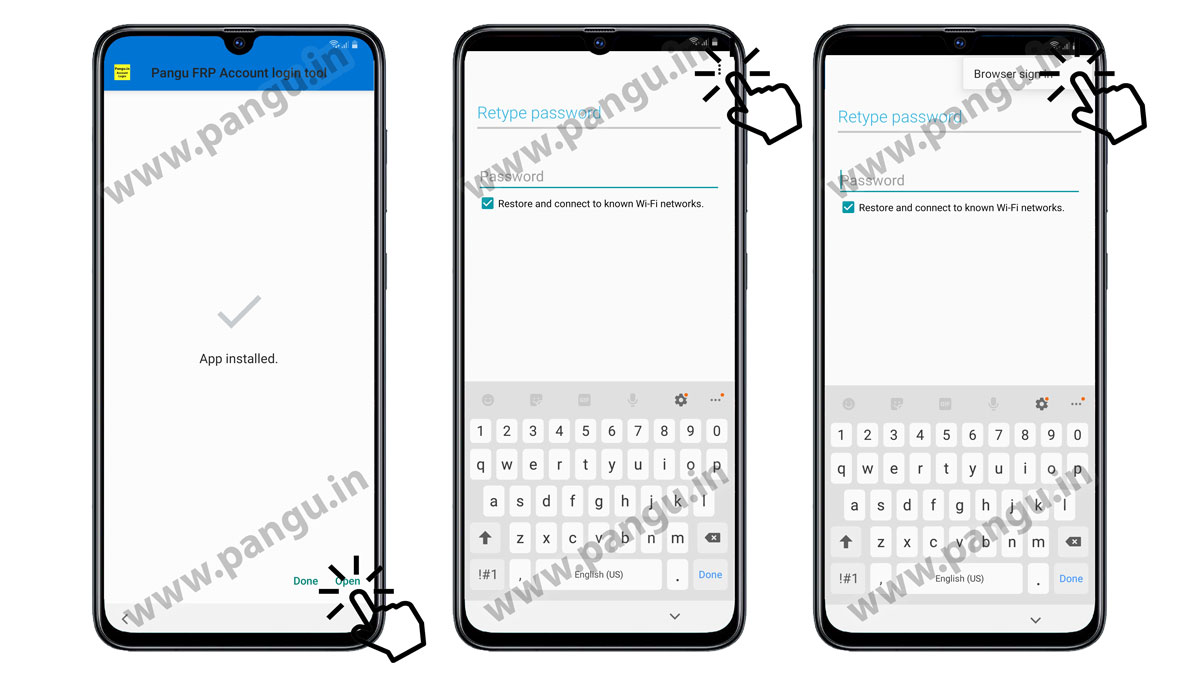
Enter your new Google account on the locked Samsung S10 G973D
On Samsung S10 G973D enter your new or old Gmail account here do not use your forgotten account.
After entering your email ID and password click on the sign-in button after the sign-in process complete. On Samsung S10 G973D press the power key for five seconds and restart your device.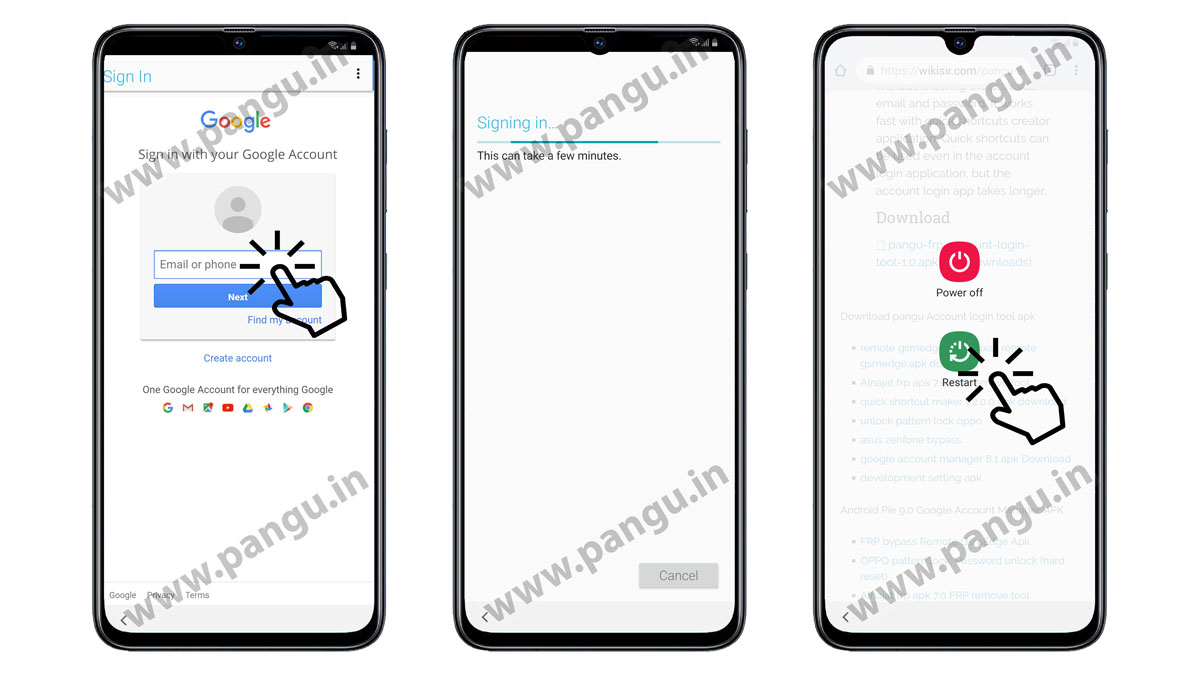
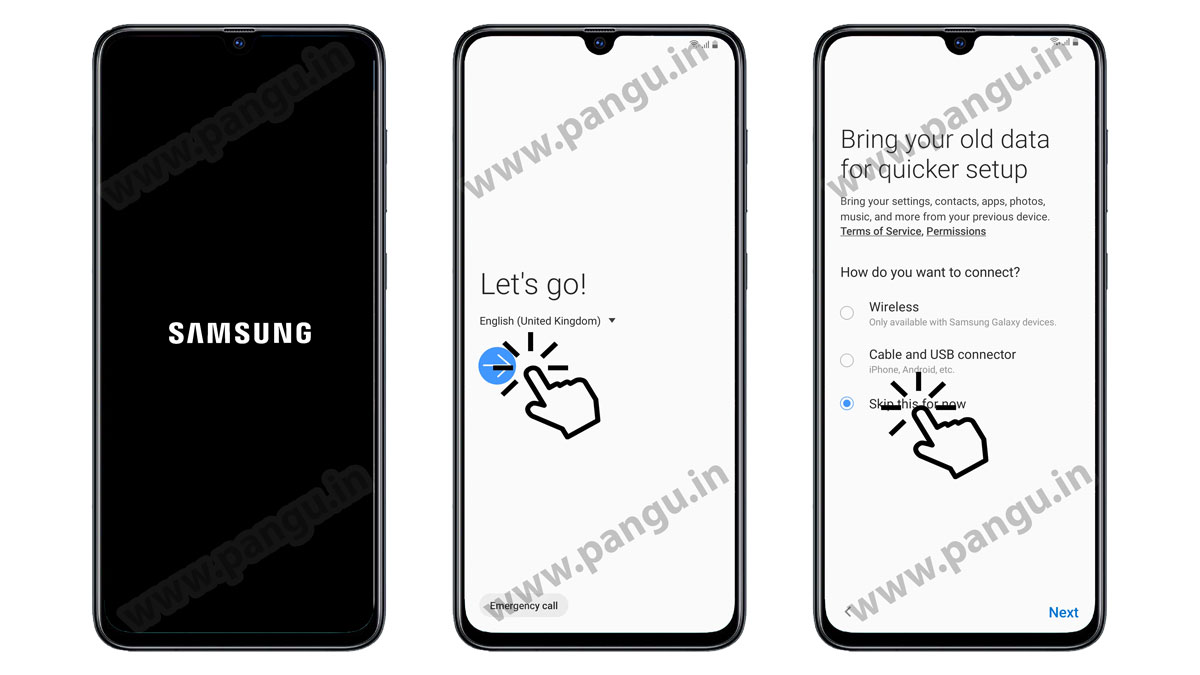
Complete Samsung set up wizard on G973D
After rebooting the Samsung S10 G973D. You have to complete the Samsung setup wizard yourself do not disconnect WiFi on Samsung S10 G973D.
Google account added on Samsung G973D
On Samsung S10 G973D Google account added if you have successfully entered your Gmail account that is mean your Samsung S10 G973D is unlocked -> now click not now on protecting your device option.
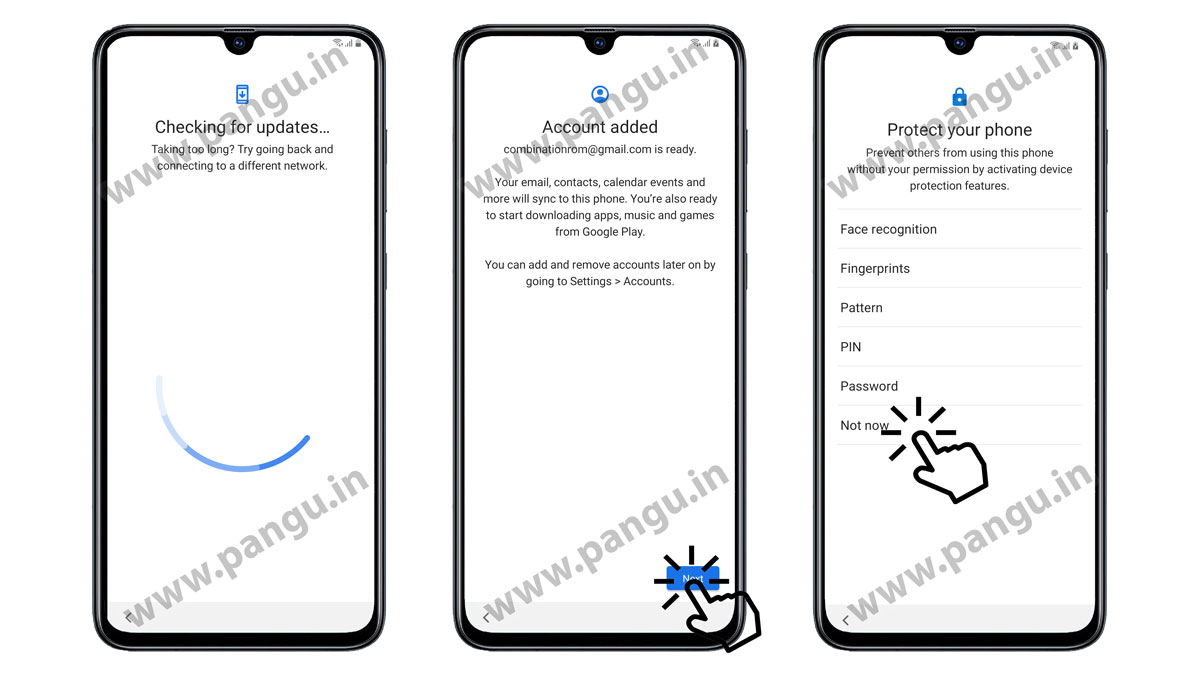
Samsung S10 G973D Review additionally app
Deselect all applications and click on the Next button otherwise it will take a longer time to set up your wizard on Samsung S10 G973D.

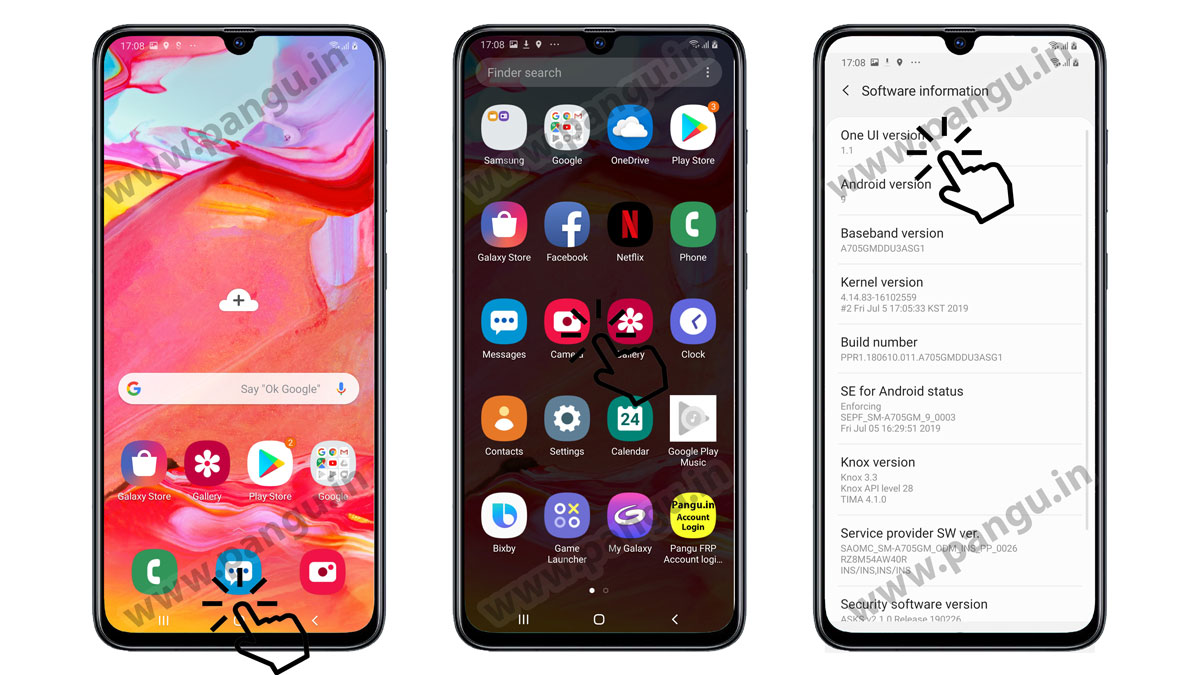
Unlocked Samsung S10 G973D successfully
We have successfully unlocked Samsung S10 G973D. After the setup complete you can factory data reset Samsung S10 G973D.
Materials
- Google account manager 8.0
- Google account manager 9.0 ( not recommended )
FAQ – Samsung S10 G973D Frequently Asked Questions
You can remove the Samsung S10 G973D FRP lock with the combination file or without combination firmware. You have to follow HighTech Remove FRP lock G973D without a Combination to remove the FRP account.
HighTech Remove FRP lock G973D without a Combination is a process to remove previously synced google account Samsung S10 G973D is an easy process. You have to follow the above process.
In case you have FRP on Samsung S10 G973D then you can use FRP Bypass APK to remove google verification. we have a complete process to use FRP bypass APK to HighTech Remove FRP lock G973D without a Combination.
Pangu FRP account login tool is the best FRP lock removal tool for Samsung S10 G973D.
Related Post
- How to fix Unfortunately the FRP Bypass Has stopped
- Updated Removed FRP Samsung J8 Plus ( J800FN, J810F, J810G )
- Best Practices Remove FRP lock G975D without a Combination
- The Result of verifying signature is Dm-verity verification failed
- Fast Remove FRP lock J260T without Combination
- Latest Method Remove FRP lock G955N without a Combination
- Best process to Remove FRP lock G973U without a Combination
- HighTech Remove FRP lock G9758 without a Combination
- Samsung firmware Galaxy Ace
- Download Samsung Firmware
Caution: This process was HighTech Remove FRP lock G973D without a Combination